
Stage 5 of 7 · Go-live
Go-live: your AI team starts answering customers
We plan the cutover with your team a week ahead, then switch on in steps: a small share of chats first, then all of them. Your team stays in the loop, and the off switch is always ready.
What this stage is
Cutover is the move from "your team answers every chat" to "the AI answers first and hands over what needs a person". We plan it a week ahead, with a checklist for each side.
Launch day is always a Monday or Tuesday, never the day before a weekend or public holiday. Both teams get two full working days to catch anything.
See it in action
Example chats and screens from this stage. Chats are illustrative, for a fictional business.
Launch morning
Day 0 starts with a small share of chats.
Your team can take any chat back
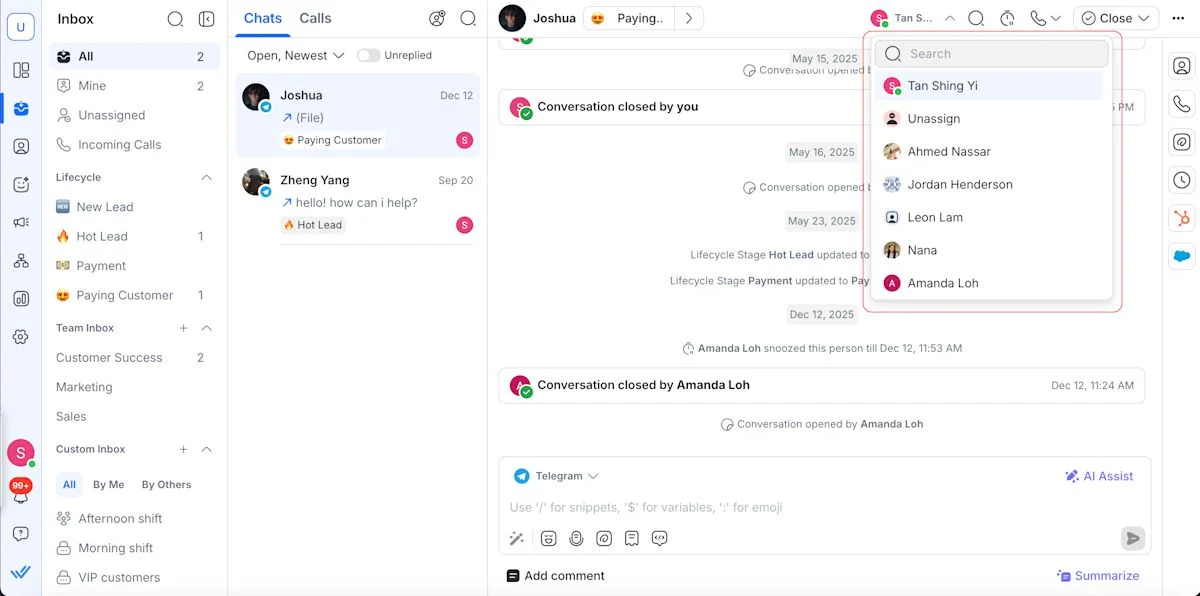
Assign the chat to yourself and reply. The AI steps back.
Close the chat when you are done
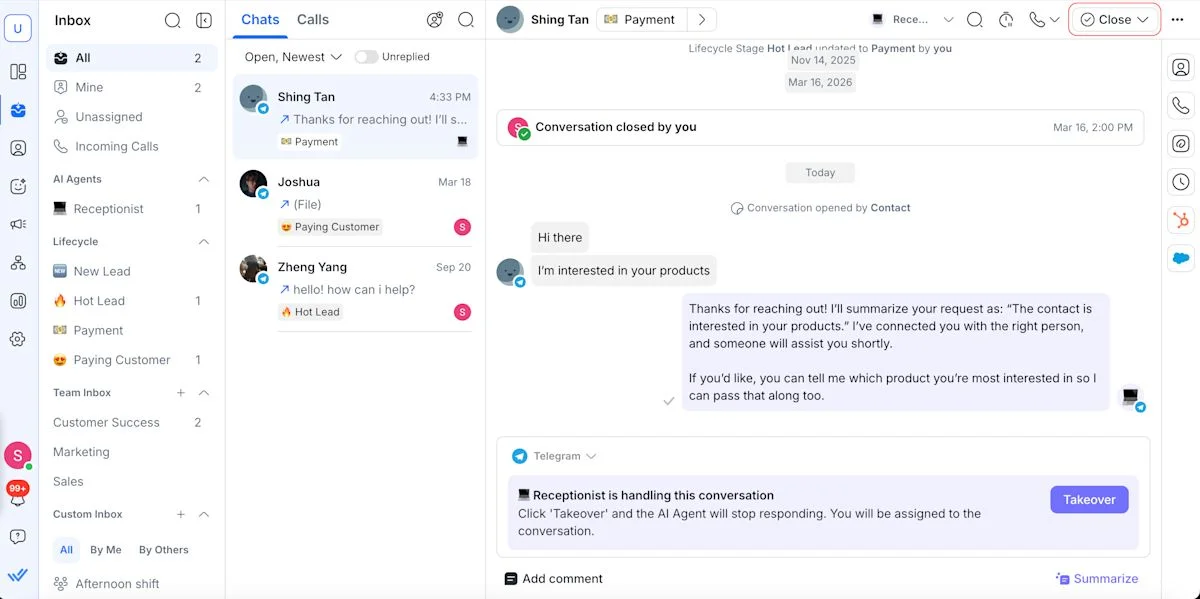
Closing a finished chat keeps follow-ups and reports accurate.
The cutover, day by day
Planned a week ahead, so launch day holds no surprises.
- T-7One week before
- Change freeze: from here we make fixes only, no new features.
- Agree the hand-over rota: who picks up chats the AI passes on, and when.
- Confirm every WhatsApp template is approved.
- List the manual broadcasts and workflows that stop, and who stops them.
- T-1The day before
- Brief your team, 30 minutes. We can run it.
- Final check of prices, promotions and opening hours.
- Stop the manual tasks the AI now handles, so customers do not get two messages.
- Day 0Launch, Monday or Tuesday
- The AI takes a small share first: a few hand-picked chats, or set hours.
- We watch every conversation it handles.
- Your team works hand-overs as they arrive.
- Days 1-3Ramp-up
- A short daily check-in with you.
- The AI's share grows as results hold, until it answers every new chat.
- ThenHypercare begins
- 30 days of close review. What hypercare means.
Your cutover checklist
Tick these off with us in the week before launch. Each one removes a reason launch day could go wrong.
Ticks are saved in this browser only, so you can work through the list over several days.
What changes for your team
Plan for these now and the first week runs smoothly.
Customer-service staff
Fewer chats, but the harder ones. The AI handles routine questions and bookings, and your team gets the chats that need a person: photos, medical or account questions, complaints. Each arrives with the full conversation, so nobody starts from scratch.
Hand-over speed matters more
A handed-over customer is waiting for a person. Agree a reply target with us, and we report against it every week.
Managers
New numbers to watch: chats the AI resolves, hand-overs, bookings made and reply times. They come in your Monday update.
Workload and roles
Chats per person drop. Plan any staffing change on 2 to 4 weeks of hypercare data, not on launch day.
Stop doing
Manual reminders and follow-up broadcasts that the AI or a workflow now sends. Doing both means customers get two messages.
How the AI hands chats to your team
Clear rules decide when a person takes over, and the customer never feels the switch.
When the AI hands over
- The customer sends a photo.
- A medical, account or payment question the AI's knowledge does not answer.
- A complaint, a problem or a refund request.
- The customer asks for a person.
- An action fails twice, such as a booking that will not save.
- What the customer sees
A short holding line, such as "Let me check on this for you". The AI never mentions a transfer. - Where the chat lands
Assigned to your hand-over team, with the whole conversation and its tags. - What your team does
Reads the history, replies, and closes the chat when done. - Out of hours
The agreed message goes out, and your team picks up when the shift starts.
Illustrative example. The customer sees one smooth conversation; your team sees everything that came before.
The off switch
What we do
- Confirm every WhatsApp template is approved by Meta before launch day.
- Test the off switch before the first real chat.
- Send your team a briefing pack and run the briefing if you would like us to.
- Review every AI conversation in the first days, and check in with you daily.
- Widen the AI's share of chats only as the results hold.
How you know it is done
Go-live is done when the AI answers every new chat and we agree with you that the results are holding.
What you will hear from us
- Launch morning
A message when the AI goes on. - Days 1 to 3
A short daily check-in. - When the stage moves
Hypercare starts, with your first weekly report date.
Common questions
Can my team still reply to customers?
Yes, at any time. Anyone can open a chat and take over, and the AI steps back.
What if the AI gets something wrong on day one?
We see it, because we review every conversation in the first days. Fixes go in within 48 hours, and we tell you what changed.
Why not launch on a Friday?
A Friday launch leaves a weekend of chats with fewer people watching. Monday or Tuesday gives two full working days.
Do we need a new WhatsApp number?
No. The AI works on your existing number and inbox.
Questions about your stage?
Message us in your project WhatsApp group, or start a chat here. Your account owner replies.